


Using QR Codes in Retail Window Displays to Drive 24/7 Sales
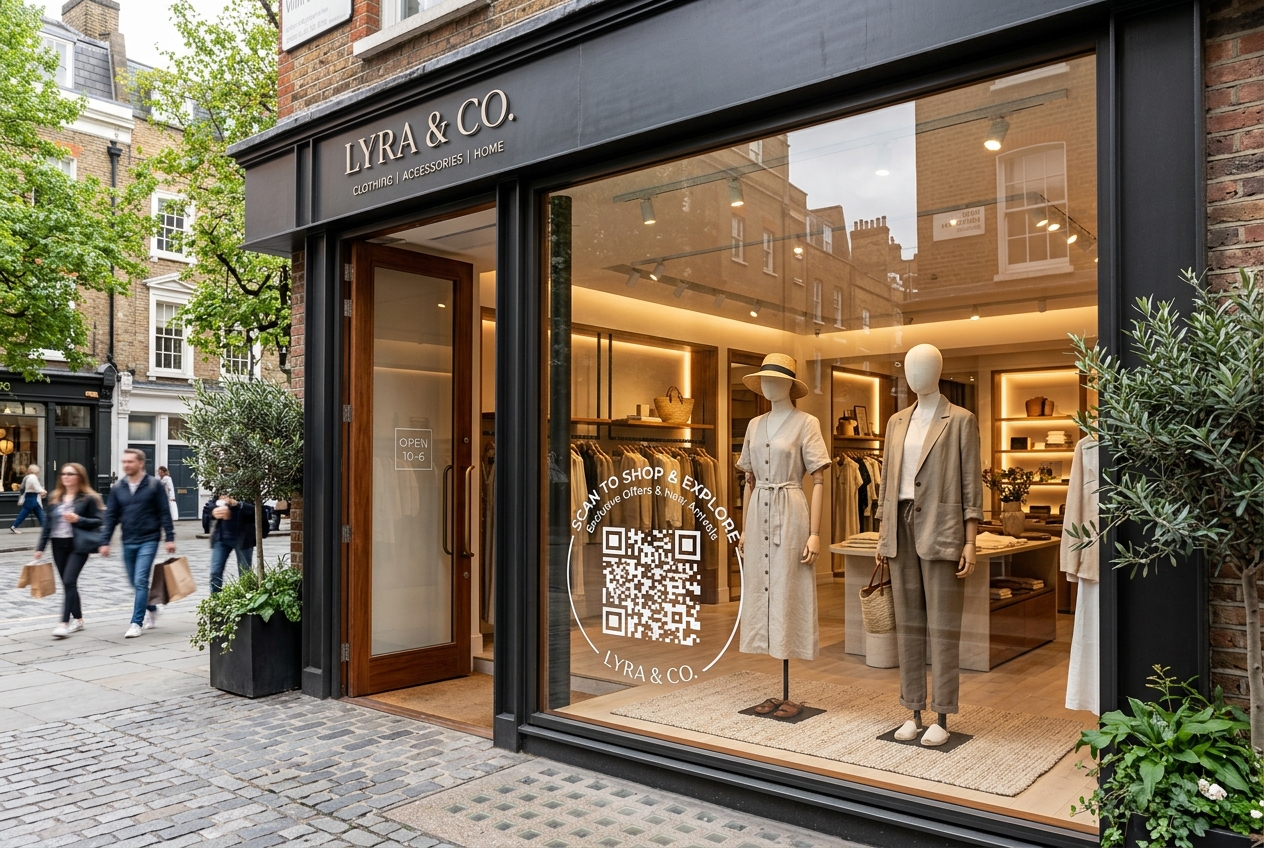
For traditional brick-and-mortar retailers, foot traffic is the lifeblood of the business. But what happens when the store lights go down and the doors lock at the end of the day? Passersby still look at your window displays, but their intent is lost as soon as they walk away.
With the emergence of dynamic QR codes, retail storefronts no longer need to close. By incorporating QR codes into your window displays, you can turn your physical windows into interactive, round-the-clock shopping channels that capture interest, drive online sales, and collect leads 24/7.
In this guide, we will explore the strategies, benefits, and best practices of using QR codes in retail window displays to maximize your offline-to-online conversions.
Why Retail Window QR Codes are a Game Changer
Incorporating QR codes into your window design creates a bridge between your physical retail presence and your digital store. Here is why it works:
1. Capture After-Hours Intent
A customer sees a dress or a product in your window at 9 PM on a Sunday. With a window QR code, they do not have to wait until Monday morning or remember to search for your brand online. They scan the code and can purchase the item instantly on their phone.
2. High-Attribution Offline Marketing
Historically, measuring the effectiveness of window displays has been difficult. By using a unique dynamic QR code for each window display, you can track exactly how many scans, page views, and sales each display generates using qr code tracking.
3. Interactive Window Shopping
Static mannequins are a thing of the past. QR codes can link to product demonstration videos, virtual try-ons, or interactive styling guides, giving customers a rich digital experience right from the street.
4. Direct App Downloads & Loyalty Sign-ups
Encourage passersby to join your brand's loyalty program, sign up for your newsletter, or download your shopping app. A simple QR code with a compelling offer (e.g., "Scan to get $10 off your first app purchase") can dramatically accelerate customer acquisition.
4 Creative Ways to Use Storefront QR Codes
1. The "Buy the Look" Window
Place a QR code directly next to a mannequin or window product display. Make the QR destination a specific landing page featuring all the items on display, allowing users to "add to cart" in seconds.
2. The Interactive Video Demo
If you sell complex, high-ticket, or feature-rich products (like electronics, home goods, or outdoor gear), place a QR code that links to an explainer video. Seeing the product in action creates immediate desire.
3. Out-of-Stock and Pre-order Portal
Do you have a hot item that is currently out of stock or launching next month? Place a QR code in the window that allows customers to join the waiting list or pre-order the item immediately, preventing missed sales.
4. Interactive Contests and Giveaways
Generate excitement by placing a large, stylized QR code in your window that links to a raffle or instant win game. This is an incredibly effective way to gather emails and build a local customer list.
Best Practices for Storefront Window QR Codes
To ensure high scan rates and a seamless customer experience, follow these design and implementation rules:
- Size Matters: Passersby will scan your window codes from several feet away. Ensure your QR code is large enough (at least 6-10 inches wide) to be scanned easily from the sidewalk.
- Contrast is Key: Standard glass can reflect glare, which makes QR codes hard to read. Use high-contrast designs—preferably white QR codes on a dark background sticker, or dark QR codes on a light background.
- A Clear Call-to-Action (CTA): Do not just put a blank QR code on the glass. Surround it with clear text like "Scan to Shop the Display" or "Scan to Unlock a 15% Discount".
- Use Dynamic QR Codes: Never use static QR codes for window displays. If you want to change the featured collection, update the URL, or redirect the traffic to a new seasonal promo, you must be able to change the destination link inside your QR code generator without replacing the physical window sticker.
- Leverage Custom Branding: Boost trust and scan rates by designing a beautiful custom QR code. Using QR Zam’s AI QR code generator, you can design artistic QR codes that match your boutique's premium look, or embed your company logo in the center.
- Verify Mobile Performance: Test the landing page on multiple device types. The page must load fast, look premium, and support quick checkout methods like Apple Pay, Google Pay, or quick guest checkouts.
Getting Started with QR Zam
Setting up your window display campaign takes minutes with QR Zam:
- Log in to your QR Zam dashboard.
- Choose Dynamic URL QR Code or Smart Routing (if you want to direct users to different languages based on their phone settings).
- Customize your QR design with custom colors, brand logos, or an artistic AI style.
- Generate and download your vector image format (SVG or EPS) for high-quality printing.
- Send the file to your local print shop to create a custom window decal.
- Track your scan counts and conversion metrics directly from your analytics panel.