


QR Codes for Product Onboarding: How to Guide Customers from Unboxing to First Value
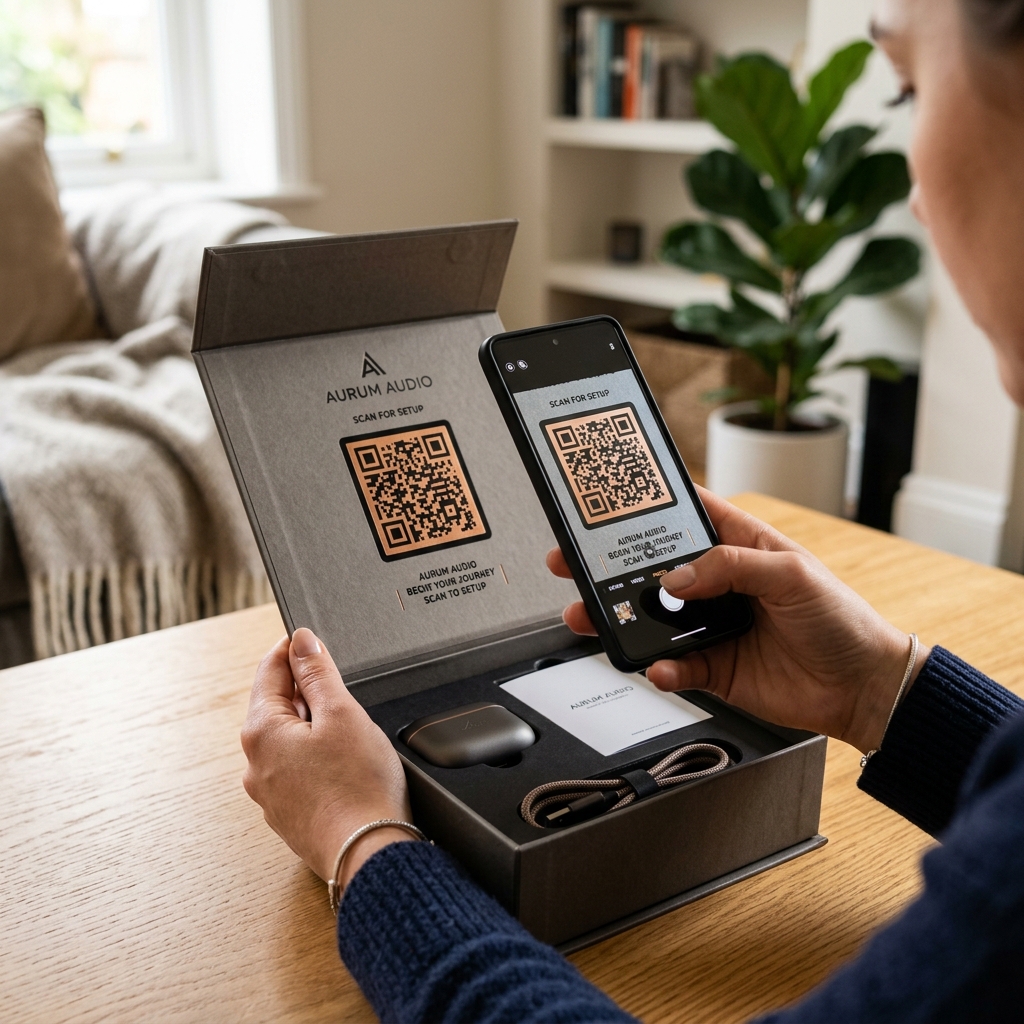
The moment a customer opens your product box is a critical touchpoint in their journey. This is the unboxing experience—a brief window of high excitement and curiosity. If your customer gets confused by a dense, 50-page paper manual or struggles to configure their new device, that excitement quickly turns into frustration, leading to product returns or a flood of customer support tickets.
In product design and growth marketing, the goal is to minimize time-to-value (TTV)—the time it takes for a customer to realize the value they were promised.
One of the most effective, low-friction ways to bridge the gap between physical unboxing and digital setup is by using dynamic QR codes. By placing a custom QR code strategically inside your packaging, you can guide users directly to interactive setup videos, digital manuals, app downloads, or warranty registration forms.
In this guide, we will explore how to design an effective QR code-driven onboarding flow that delights customers and protects your bottom line.
Why Use QR Codes for Product Onboarding?
Traditional paper manuals are static, expensive to print, and easily lost. They cannot play videos, they cannot translate themselves automatically, and they cannot be updated once shipped.
By replacing or supplementing paper inserts with dynamic QR codes, you unlock several major benefits:
- Instant Access to Rich Media: Instead of reading text instructions, users scan to watch a 60-second setup video. Visual guidance dramatically reduces configuration errors.
- Dynamic Updates: If you update your onboarding software, release a new app version, or find a bug in the setup process, you can change the QR code's destination URL instantly via your QR Zam dashboard without reprinting packages.
- Environmentally Friendly and Cost-Effective: Reduce package size and printing costs by replacing multi-language paper booklets with a single card featuring a QR code.
- Actionable Scan Analytics: Track how many customers are scanning the codes, when they scan, and what devices they use. If scan rates are low, you can adjust placement or design.
Creative Ways to Place QR Codes in Onboarding Flows
To maximize scan rates, the QR code must be placed where the user cannot miss it. Here are some of the most effective placements:
1. The Inside Lid (First-Sight Placement)
When the customer lifts the box lid, the QR code should be the first thing they see. Print it directly on the inside cardboard with a clean, inviting call-to-action (CTA) like:
"Scan to watch the 1-minute quickstart guide!"
2. A Dedicated "Quick Start" Insert Card
Instead of a thick booklet, include a single, premium card placed right on top of the product. Use a custom, high-contrast QR code that matches your brand colors and features your logo to build trust.
3. Direct Sticker Placement on the Product
For smart appliances or hardware devices that require physical interaction (e.g., holding a button to pair Bluetooth), place a temporary sticker directly on the device. Once the pairing is complete, the user can peel it off.
Key Onboarding Destinations to Link To
What should happen when a customer scans your onboarding QR code? Here are the most effective destinations based on your product type:
1. Interactive Video Tutorials
Video is the gold standard for onboarding. Link your QR code directly to a YouTube video, a Vimeo player, or a custom landing page showing a step-by-step unboxing and configuration walk-through.
2. Smart App Store Routing
If your hardware product requires a mobile app to function (e.g., smart home devices, fitness trackers), use QR Zam's Smart Routing features. You print a single QR code, but it automatically detects the scanner's operating system:
- iOS users are redirected to the Apple App Store.
- Android users are redirected to the Google Play Store.
3. One-Click Warranty & Product Registration
Getting customers to register their products is historically difficult. Make it seamless by directing scanners to a mobile-optimized registration form. You can even pass URL parameters to auto-fill the model number, saving the customer time and increasing registration rates by up to 40%.
4. Direct Messaging for Customer Support
If a customer runs into trouble, make it easy for them to get help before they write a negative review. Link the QR code to a WhatsApp Business chat, a live web chat, or an SMS shortcode, opening a direct support channel instantly.
Best Practices for QR Onboarding Success
To ensure your customers have a seamless experience, follow these design and implementation rules:
- Always Use Dynamic QR Codes: Never print static QR codes on packaging. If your website URL changes or you migrate your help center, a static code becomes a dead link, making the packaging obsolete.
- Ensure High Contrast and Readability: Onboarding environments can have varied lighting. Design your QR code with a clear background and high-contrast foreground.
- Use a Custom Domain: Route your QR code through a branded URL (e.g.,
setup.yourbrand.com) rather than a generic redirect. This reassures users that the code is safe to scan. - Test on Multiple Devices: Before printing thousands of boxes, scan the QR code under low-light and high-glare conditions using various smartphone models.
Set Up Your Onboarding QR Codes Today
Ready to transform your unboxing experience? With QR Zam, you can easily generate branded, dynamic QR codes, set up smart app-store routing, and track scan engagement in real time.