


How to Create Multi-URL QR Codes: Drive Traffic to Multiple Destinations with One Code
When businesses run physical marketing campaigns—whether printing brochures, placing billboard advertisements, designing product packaging, or distributing trade show flyers—they face a persistent challenge: audience fragmentation.
Not every customer who scans your QR code has the same intent, uses the same device, or speaks the same language:
- An iPhone user expects an instant download from the Apple App Store, while an Android user needs Google Play.
- An international tourist requires information in Spanish or Japanese, while domestic customers expect English.
- A retail shopper might want to browse customer reviews, claim an instant promo code, or find the nearest physical store.
If you rely on a standard static QR code, you are forced to choose a single destination URL. This one-size-fits-all approach introduces friction, leads to high bounce rates, and lowers your overall return on ad spend (ROAS).
The solution is the Multi-URL QR Code. By utilizing intelligent routing and branded mobile link hubs, a single printed QR code can seamlessly direct scanners to multiple destinations based on context or present an interactive menu of high-converting options.
In this comprehensive guide, we will explore the different types of multi-URL QR codes, their measurable business impact, and step-by-step instructions on setting them up with QR Zam.
What Is a Multi-URL QR Code?
A multi-URL QR code is a dynamic QR code that connects a single physical code to multiple digital destinations. Rather than locking scanners into a rigid, hardcoded link, it intelligently directs users based on predefined rules or presents a tailored landing interface.
From an architectural standpoint, multi-URL QR codes function through two primary mechanisms:
| Implementation Model | Architecture Type | Mechanism & Capabilities |
|---|---|---|
| Architecture A: Smart Routing | Server-Side Conditional Redirection | Automatically evaluates device OS, IP geolocation, browser language, or schedule and triggers instant HTTP redirection. |
| Architecture B: Mobile Link Hub | Client-Side Branded Action Portal | Loads an ultra-fast mobile landing page showcasing multiple branded buttons, social profiles, video guides, and contact options. |
Architecture A: Conditional Smart Routing
In this model, the server instantly evaluates contextual metadata from the scanning device (user-agent header, IP geolocation, system time, or total scan count) and executes a real-time HTTP 302 redirect to the appropriate URL:
- Device OS Routing: Automatically sends iOS users directly to the Apple App Store, Android users to the Google Play Store, and desktop scanners to a web landing page.
- Geographic Routing: Detects the scanner's country or region, dispatching them to localized product catalogs with local currency, regional inventory, and compliant checkout gateways.
- Language-Based Routing: Reads the preferred language of the scanner’s mobile browser, instantly displaying localized copy without requiring the user to locate a language switcher menu.
- Time-Based Scheduling: Redirects users to different destinations based on the time of day or day of the week (e.g., a breakfast menu from 7:00 AM to 11:00 AM, a dinner menu after 5:00 PM, and an automated reservation portal during closed hours).
- Scan Count & Cyclical Rotation: Distributes incoming traffic across multiple URLs based on scan quotas or percentage splits (e.g., 50/50 A/B split testing for landing page conversion optimization).
Architecture B: Dynamic Mobile Link Hubs
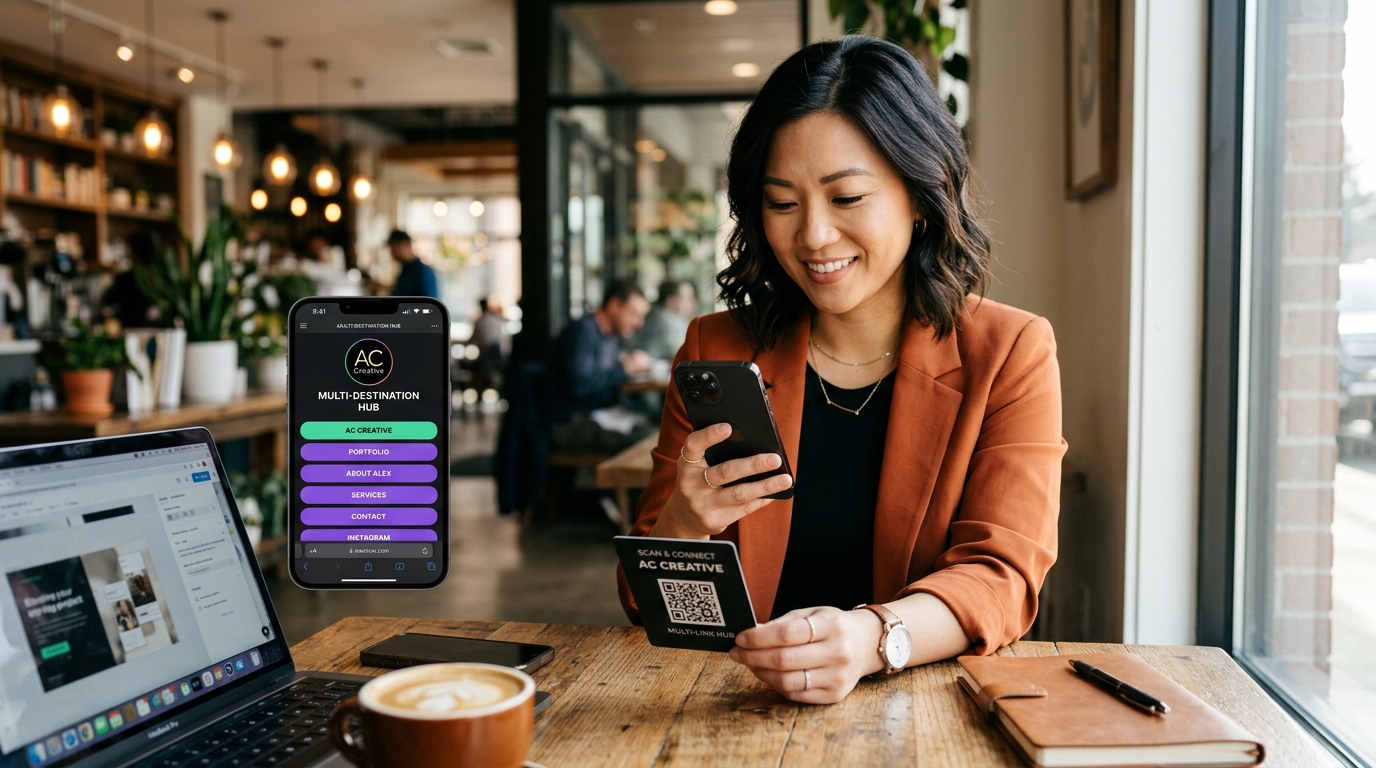
In this model, scanning the QR code loads an ultra-fast, mobile-optimized micro-landing page (similar to a link-in-bio portal). The user is presented with a branded menu featuring multiple clear call-to-action (CTA) buttons:
- Direct product purchase links
- Customer support channels (WhatsApp, email, click-to-call)
- Social media profiles (Instagram, YouTube, TikTok, LinkedIn)
- Product video tutorials or user manuals
- Customer review submission forms
Strategic Growth Benefits of Multi-URL QR Codes
For growth marketers and business operators, implementing multi-URL QR codes delivers clear advantages over traditional single-link implementations:
1. Drastically Lower Acquisition Friction
Every additional click, tap, or manual search between a physical scan and the target conversion costs you customers. For mobile app publishers, printing two separate QR codes (one for iOS and one for Android) clutters visual design and confuses customers. A single smart-routing QR code cuts cognitive load in half and doubles app install velocity.
2. Global Campaign Scalability on a Single Print Run
For multinational brands, international events, and hospitality providers, printing localized materials for every language is cost-prohibitive. With multi-URL language routing, you can print one batch of international packaging or signage. The dynamic system automatically serves Spanish to travelers from Madrid, Japanese to visitors from Tokyo, and English to international guests.
3. High-Velocity A/B Split Testing for Physical Ads
Marketers running print ads, direct mailers, or out-of-home (OOH) billboards often struggle to split test messaging. By applying cyclical or percentage-based multi-URL routing, you can distribute traffic equally between two competing landing pages (e.g., Offer A with free shipping vs. Offer B with a 20% discount), accurately determining which hook yields the highest conversion rate.
4. Zero Re-Printing Costs for Updated Destinations
Because multi-URL codes run on dynamic QR code technology, your printed materials remain evergreen. You can add new destination links, swap holiday promotional offers, or update routing logic in real time from your dashboard without spending a dime on re-printing physical collateral.
Step-by-Step Guide: How to Create a Multi-URL QR Code in QR Zam
Creating and launching a multi-URL QR code with QR Zam requires no coding knowledge and takes only minutes:
Step 1: Select Your Dynamic QR Code Type
Log in to your QR Zam Dashboard and click Create QR Code.
- To set up automatic conditional redirection, select Smart Routing.
- To build an interactive multi-link landing page, select Mobile Landing Page / Link Hub.
Step 2: Configure Your Destinations and Routing Rules
Depending on your chosen architecture:
- For Smart Routing: Add your default fallback URL. Next, click Add Rule. Choose your criteria—such as Device OS (iOS, Android, Windows, macOS), Country, or Time Schedule—and input the corresponding destination URL for each rule.
- For Mobile Link Hub: Upload your brand logo, select your theme colors, and add action buttons for each destination link. You can include icons for social media, phone dialing, PDF downloads, and custom web links.
Step 3: Connect Your Custom Domain
To maximize scan rates and brand trust, connect your custom branded domain (e.g., qr.yourbrand.com) using QR Zam's custom domain feature. Scanners will see your official brand name in their camera viewfinder, increasing click-through confidence by over 30%.
Step 4: Customize Your QR Code Aesthetics
Design your QR code to stand out from generic black-and-white grids:
- Apply brand gradient colors or distinct eye patterns.
- Embed your corporate logo into the center of the code.
- Add an intuitive CTA frame such as "Scan to Connect", "Download Our App", or "Explore All Links".
Step 5: Test and Download High-Resolution Assets
Before mass printing, test the code across multiple devices (iPhone and Android) to confirm that the conditional routing logic or mobile landing hub renders flawlessly. Once verified, download your assets in vector formats (SVG, PDF, or high-res PNG) for commercial printing.
5 High-Impact Use Cases for Multi-URL QR Codes
| Industry / Application | Routing Method | Measurable Business Outcome |
|---|---|---|
| Mobile App Promotion | OS-Based Smart Routing | +45% App Store conversions |
| DTC Product Packaging | Branded Multi-Link Action Hub | +60% Re-orders & reviews |
| Global Trade Shows | Browser Language Auto-Detection | +35% International leads |
| Food & Beverage Dining | Time-Based Schedule Routing | +25% Off-peak lunch sales |
| Direct Mail Marketing | A/B Percentage Split Routing | +18% Optimized campaign ROI |
1. Cross-Platform App Promotion
Mobile gaming studios, fintech apps, and on-demand delivery services place QR codes on subway posters, flyers, and desktop landing pages. With OS-based multi-URL routing, one code routes iOS users straight to the App Store and Android users to Google Play, preventing lost installs caused by generic intermediate web pages.
2. DTC E-Commerce Product Packaging
Leading direct-to-consumer (DTC) brands place a multi-URL link hub QR code inside product unboxing packaging. When customers scan the card, they access:
- A 60-second video assembly tutorial
- A one-click warranty registration form
- An exclusive 15% discount for their next subscription purchase
- Direct customer support via WhatsApp or live chat
3. International Trade Shows and Conferences
Exhibitors meeting international attendees at global expos can print a single badge or booth banner. When an attendee scans the code, QR Zam detects the visitor's device language, instantly displaying product brochures, technical spec sheets, and meeting booking calendars in English, German, French, or Mandarin.
4. Restaurants, Bars & Nightclubs
Hospitality operators can use time-sensitive multi-URL routing on dining tables:
- Morning (7:00 AM - 11:30 AM): Breakfast and specialty coffee menu
- Afternoon (11:30 AM - 4:00 PM): Quick-serve lunch specials
- Evening (4:00 PM - 11:00 PM): Full dinner menu and craft cocktail list
- Late Night (11:00 PM onwards): After-hours bar bites and digital feedback forms
5. Multi-Location Franchises and Service Providers
Plumbers, cleaning services, and retail franchises operating across multiple postal codes can utilize geolocation-based multi-URL routing. Scanning a billboard or truck decal automatically connects the prospect to the nearest branch office, phone dispatcher, or localized booking portal.
Best Practices for Multi-URL QR Code Campaigns
To achieve maximum conversion and scan velocity, adhere to these proven industry guidelines:
- Always Provide a Clear Call-to-Action: Don't leave scanners guessing. Frame your code with action-oriented copy such as "Scan to Download for iOS & Android" or "Scan for Menus, Promos & Wi-Fi".
- Always Configure a Reliable Fallback URL: If a scanner's device falls outside your specific conditional criteria (e.g., a desktop browser or rare mobile operating system), ensure your default fallback URL points to an evergreen landing page.
- Verify High Visual Contrast: Ensure the QR code has sufficient contrast against its background (dark pattern on a light background) and leave adequate quiet-zone margin around the borders.
- Track Granular Scan Analytics: Utilize qr code analytics to track total scans, unique visitors, device breakdown, operating systems, and geographic clusters. Use this data to continuously refine your routing rules and optimize marketing spend.
Upgrade to Intelligent Multi-Destination QR Codes with QR Zam
Stop limiting your offline marketing campaigns to a single static URL. With multi-URL dynamic QR codes, you deliver tailored, frictionless experiences that match each user's unique context, boosting customer satisfaction and maximizing campaign conversion rates.
Ready to elevate your print marketing strategy? Create your multi-URL QR code with QR Zam today and turn every scan into measurable revenue.