


How to Create a QR Code for Stripe Payment Links: Accept Credit Cards, Apple Pay, and In-Person Payments Without a POS Terminal
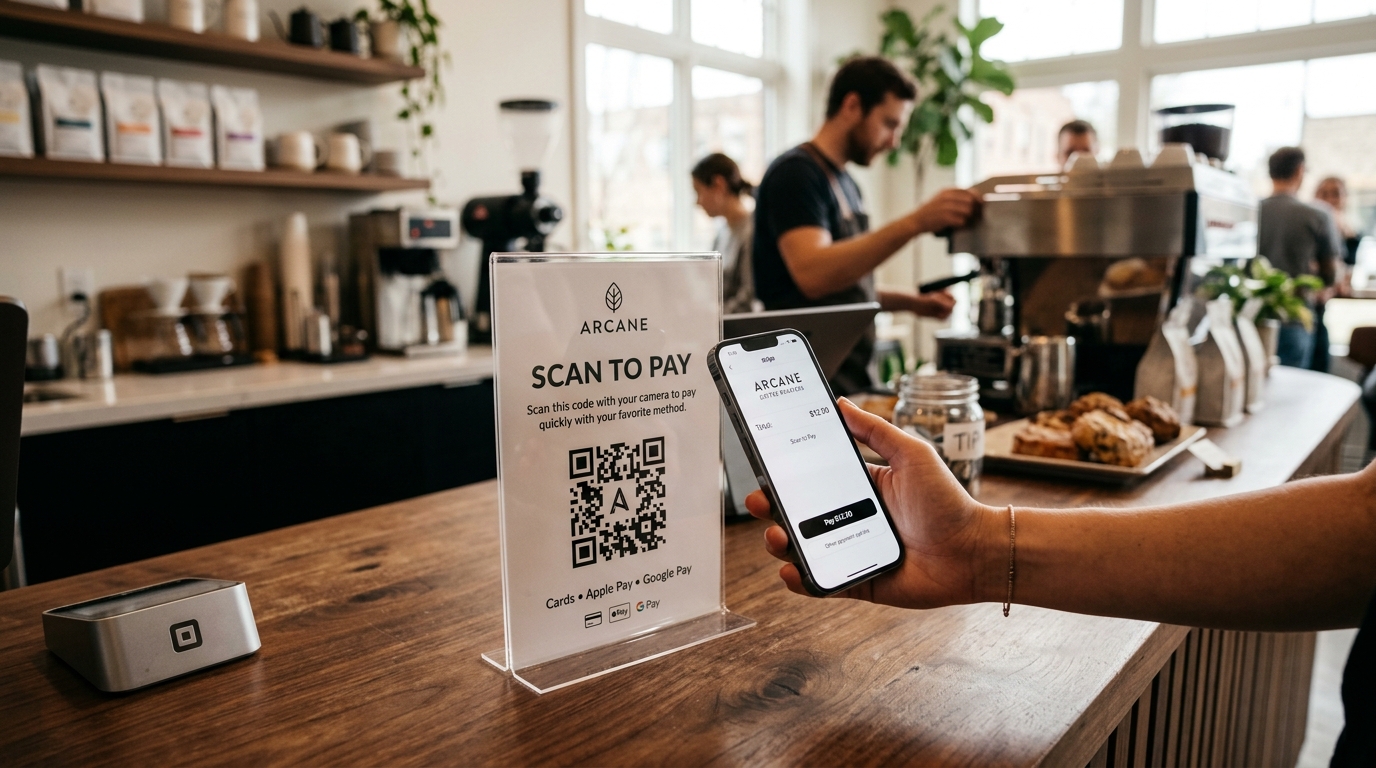
For boutique retailers, pop-up vendors, independent consultants, service contractors, and event organizers, accepting in-person payments has traditionally required expensive point-of-sale (POS) hardware. Traditional card readers and countertop smart terminals typically cost between $300 and $800 upfront, carry recurring monthly rental fees, and often fail due to Bluetooth pairing glitches or dead batteries at critical moments.
Furthermore, when businesses invoice clients or collect deposits in the field, waiting for clients to sit at a desktop computer to enter credit card details delays cash flow and drives up unpaid receivable rates.
Stripe Payment Links combined with dynamic QR codes completely eliminate this friction.
By generating a Stripe Payment Link and converting it into a custom, branded dynamic QR code via QR Zam, any business can turn an acrylic counter stand, paper invoice, service van magnet, or market stall banner into an instant, contactless checkout terminal. Customers simply aim their smartphone camera, tap the prompt, and complete payment in under 15 seconds using Apple Pay, Google Pay, or major credit cards.
In this comprehensive guide, we will examine why dynamic QR codes are essential for Stripe checkout links, evaluate real-world touchpoint deployment strategies, and walk step-by-step through creating and tracking high-converting payment QR codes with QR Zam.
Why Connect Physical Touchpoints to Stripe Payment Links?
Bridging offline customer interactions directly to Stripe's payment infrastructure drastically lowers merchant overhead while elevating buyer trust and transaction speed.
| Checkout Method | Traditional Dedicated POS Terminal | Static Stripe QR Code | Dynamic Stripe QR Code (QR Zam) |
|---|---|---|---|
| Hardware Upfront Cost | $300 – $800+ per terminal | $0 (Print on paper / acrylic) | $0 (Print on paper / acrylic) |
| Monthly Software Fees | $30 – $100 / month per register | $0 | Low SaaS subscription |
| Payment Options | Tap / Chip / Dip physical card | Apple Pay, Google Pay, Cards, Klarna | Apple Pay, Google Pay, Cards, Klarna |
| Link & Price Flexibility | POS catalog change required | None (Hardcoded URL; breaks if changed) | Instant real-time URL & price updates |
| Branded Domain | Fixed POS interface | Generic buy.stripe.com | Custom domain (e.g., pay.yourbrand.com) |
| Scan & Conversion Analytics | Transaction logs only | Zero visibility into scans or drop-offs | Real-time scan metrics, devices, locations, UTMs |
| Smart Routing | Single currency / terminal | Single destination only | Route by currency, customer language, or device |
Why You Must Use a Dynamic QR Code for Stripe Payment Links
While Stripe allows users to generate basic static QR codes from its dashboard, deploying a static QR code in physical print collateral creates severe operational and financial vulnerabilities.
1. Zero Reprint Costs When Products, Prices, or Links Change
What happens when you adjust the price of a service package, retire a seasonal product, or switch from a fixed-amount checkout to an open-ended donation link? With a static QR code, the encoded URL is etched permanently into the printed pixels. Every countertop sign, window sticker, direct mail postcard, and product label must be thrown away and reprinted at substantial expense.
With a dynamic QR code powered by QR Zam, the underlying destination URL can be changed in seconds from your web dashboard while the printed code remains completely unchanged.
2. Custom Domain Verification to Prevent Customer Phishing Suspicions
Consumers have become acutely aware of QR code tampering and phishing threats (quishing). When a customer scans a generic QR code and sees an unfamiliar domain or long alphanumeric tracking redirect, transaction hesitation skyrockets, resulting in abandoned checkouts.
With QR Zam's Custom Domains, your QR code routes through your verified corporate subdomain (such as pay.yourcompany.com/checkout). This reinforces brand authority, guarantees authenticity, and lifts checkout completion rates by up to 35%.
3. Granular Scan-to-Payment Funnel Analytics
Understanding how many customers scan your physical signage versus how many complete checkout provides critical insight into your sales funnel. QR Zam records:
- Total scan volume and unique visitor counts
- Scan spikes by time of day and day of week
- Geographical location down to the city level
- Mobile device operating systems (iOS vs. Android)
By comparing scan volume in QR Zam against completed transactions in your Stripe dashboard, you can accurately calculate offline-to-online conversion rates across individual retail locations, trade show booths, or delivery routes.
4. Automatic UTM Parameter Attribution
When running multi-channel campaigns, identifying which physical touchpoint generated revenue is paramount. With QR Zam, you can append UTM parameters to your Stripe Payment Link:
https://buy.stripe.com/5kAbJ8...?utm_source=qr_zam&utm_medium=counter_tent&utm_campaign=downtown_store_launch
When transactions settle, Stripe logs these metadata parameters, enabling your accounting and analytics systems to attribute revenue directly to specific physical assets.
Step-by-Step: How to Create a Stripe Payment Link QR Code with QR Zam
Transforming a Stripe checkout URL into a branded, trackable dynamic QR code takes less than two minutes.
Step 1: Create Your Payment Link in Stripe
- Log in to your Stripe Dashboard and navigate to More > Payment Links (or search "Payment Links").
- Click + New.
- Select an existing product from your catalog or click Add a new product (specify title, description, price, and whether the charge is one-time or recurring).
- Configure payment methods: Ensure Apple Pay and Google Pay are enabled for frictionless 1-tap mobile checkouts.
- (Optional) Under Advanced Options, enable customer phone number collection, invoice address requirements, or custom post-payment confirmation redirect URLs.
- Click Create Link and copy the generated link (e.g.,
https://buy.stripe.com/00g7s9...).
Step 2: Open QR Zam and Choose Dynamic URL
- Navigate to your QR Zam dashboard.
- Select Dynamic URL from the QR code type selector.
- Paste your Stripe Payment Link into the Target URL field.
- Give your campaign an intuitive name (e.g.,
Farmers Market Stall A - Cold Brew 16oz) for effortless reporting later.
Step 3: Brand Your QR Code with Colors and Brand Logo
A customized QR code that reflects your brand identity signals legitimacy and elevates scan velocity:
- Center Logo: Upload your corporate emblem or a recognized payment badge (such as the Stripe or Apple Pay emblem) with automated error-correction margin.
- Brand Palette: Set your code module and corner marker (eye) colors to match your brand's primary color palette. Ensure high contrast against the background.
- Shape Customization: Select sleek dot patterns and corner frame styles that harmonize with your physical collateral.
Step 4: Add a Prominent Call-to-Action (CTA) Frame
Never display a naked QR code without context. Customers must immediately understand what will happen when they scan. QR Zam offers pre-designed, customizable call-to-action frames:
SCAN TO PAY WITH CARD OR APPLE PAYFAST CONTACTLESS CHECKOUTSCAN TO PAY INVOICE
Step 5: Test on Multiple Devices and Export Vector Assets
- Test scan your preview code with both an iPhone and an Android smartphone to confirm that the Stripe checkout sheet renders instantly.
- Download your finished graphic in SVG or EPS format for flawless commercial printing onto acrylic signs, metal plaques, and banner vinyl without pixel degradation. Use high-resolution PNG for digital displays or invoices.
High-Converting Touchpoints for Stripe QR Codes
Deploying Stripe Payment Link QR codes across strategic offline locations creates instant revenue capture points throughout the customer journey:
| Physical Touchpoint | Recommended Placement | Target Audience & Use Case | Recommended Call-to-Action (CTA) |
|---|---|---|---|
| Acrylic Countertop Tents | Directly beside cash register / order point | In-store shoppers preferring contactless mobile wallet | "Scan to pay with Apple Pay, Google Pay, or Card" |
| Paper Invoices & Work Orders | Top-right header or tear-off remittance slip | Home service clients (plumbing, HVAC, landscaping) | "Scan to settle this invoice instantly online" |
| Pop-Up & Market Stall Banners | Eye-level on table runner or pop-up canopy leg | Festival and market crowds buying artisanal goods | "Skip the terminal line: Scan to pay in 10 seconds" |
| Restaurant Table Stickers | Corner of dining table or bar coaster | Patrons wanting to settle tabs or pay for express lunch | "Ready to leave? Scan to pay your bill instantly" |
| Service Fleet Vehicle Decals | Rear door or side panel of service vans | Neighbors and onlookers seeking instant service booking | "Scan to book and deposit your service inspection" |
| Charity Gala & Event Badges | Back of lanyard badges or tabletop centerpieces | Donors and attendees contributing to silent auctions | "Scan to donate with 1-tap mobile wallet" |
Advanced Stripe QR Strategies to Maximize MRR and Cash Flow
For scaling businesses and agencies managing client payment ecosystems, QR Zam provides advanced capabilities that drive measurable commercial advantage:
1. Smart Routing by Currency and Language
If your business operates in tourist destinations or serves international clientele, presenting a checkout page in a foreign currency or language introduces friction.
With QR Zam's Smart Routing, a single printed QR code dynamically routes scanners based on device language and location:
- US-based or English-configured devices route to USD pricing with English copy.
- European scanners route to an EUR-denominated Stripe link.
- Vietnamese scanners route to VND currency with localized payment instructions.
2. Dynamic Price & Promotion Switches Without Re-engraving Signs
High-end boutique stores often utilize expensive laser-engraved brass or wooden QR plaques on retail displays. When running weekend flash promotions or adjusting tiered pricing:
- Simply create a new Stripe Payment Link reflecting the promotional price.
- In your QR Zam dashboard, edit the destination of your dynamic QR code.
- Your existing luxury plaques instantly route shoppers to the discounted checkout link without costly physical replacements.
3. Open-Ended Amount Collection for Gratuity and Tipping
Stripe Payment Links support variable customer-entered amounts. By configuring a link where the customer chooses how much to pay, you can deploy dynamic QR codes on hospitality bill folders, salon mirrors, and tour bus headrests for frictionless digital tipping and gratuities.
4. Direct Webhook Automation into Accounting Systems
Because every scan routes through a dynamic link into Stripe, you can leverage Stripe Webhooks alongside QR Zam API triggers to automate fulfillment:
- Instant receipt generation via SendGrid or Postmark.
- Automated updates to QuickBooks, Xero, or ERP inventory databases.
- Real-time Slack or SMS notifications alerting field technicians that an on-site customer has completed payment.
Best Practices for QR Code Design and Physical Print Safety
To ensure frictionless checkout experiences and maintain robust transaction security, follow these technical standards:
- Maintain Strong Foreground-to-Background Contrast: Always print dark QR pixels on a crisp, light background. Dark backgrounds with pale modules often fail on budget smartphone sensors under harsh or dim lighting.
- Adhere to the 10:1 Viewing Distance Ratio:
- For handheld invoices or counter tents viewed at 30 cm: minimum size is 3 x 3 cm (1.2 x 1.2 inches).
- For table runners viewed at 1 meter: minimum size is 10 x 10 cm (4 x 4 inches).
- For vehicle decals or event banners viewed at 3 meters: minimum size is 30 x 30 cm (12 x 12 inches).
- Preserve the 4-Module Quiet Zone: Keep a clean margin free of graphics, borders, or typography around all four sides of the code to prevent scanner framing errors.
- Employ Tamper-Resistant Materials: For outdoor or public point-of-sale displays, use UV-laminated vinyl, acrylic encasements, or engraved aluminum to prevent bad actors from sticking unauthorized overlay QR stickers on your signs.
Conclusion: Transform Every Offline Interaction into an Instant Checkout
The era of clunky, rented hardware terminals and delayed invoicing is giving way to streamlined, mobile-first commerce. Combining the global processing reliability of Stripe with the branding, tracking, and flexibility of QR Zam empowers businesses of all sizes to accept payments anywhere, anytime, at virtually zero hardware cost.
By upgrading to branded dynamic QR codes, you protect your business against costly reprints, build unshakeable customer trust, and accelerate your cash flow.
Ready to turn your physical touchpoints into revenue-generating sales points? Create your dynamic Stripe payment QR code with QR Zam today and experience seamless in-person mobile checkout.